
Reviewed by: BloxFruitsCode editorial team
Method: Manual review of trade values and comparison logic
This Blox Fruits trade calculator helps you to compare the fruits you are giving with the fruits you are receiving before accepting an offer. You can check the total value on both sides, see the value gap, and use the result with Blox Fruits values when demand also matters.
⚖️ Trade Calculator
Add items to compare trade values instantly
You Give
You Receive
📋 Wishlist Builder
List items you want and items you don't — then post it as a wishlist ad
I Want
Not Interested
How to use the Blox Fruits Trade Calculator?
This Blox Fruits Trade calculator is built for one clear job, which is comparing the value of the fruits on your side of a trade against the value of the fruits on the other side before you accept the deal, reject it, or start changing the offer to bring both sides closer.
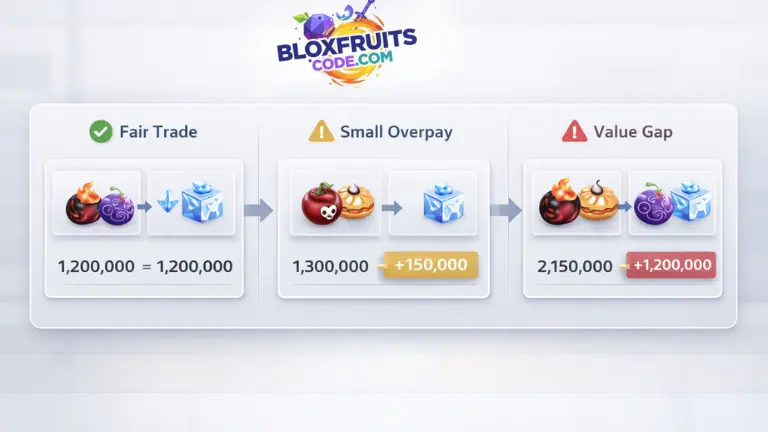
You should add the fruits you are giving on one side and the fruits you are receiving on the other side. The calculator then shows the total value on both sides and the gap between them, which gives you a fast way to see whether the offer is close, slightly uneven, or too far apart before you rely only on chat offers or quick guesses.
A page like this becomes useful because many users do not need a long trading article when they are already in the middle of an offer. They need a quick trade comparison tool and a short explanation of how to read what the tool is showing.
How to read the result?
The result on this page should not be treated like a yes or no button that makes the final trade decision for you. The result should be treated like a comparison reference that shows whether the two sides are close in value, slightly uneven, or clearly separated by a larger value gap.
A close result usually means the trade is near a fair range on paper, but a close value does not always mean both sides are equally attractive in live trade rooms because demand can still change how users react to the same offer. A result with a small gap usually means one side is doing a small overpay. A result with a wide gap usually means the trade is too uneven unless one side is intentionally adding extra value.
The strongest use of this calculator is not just seeing the numbers. The strongest use is reading the numbers early enough to stop a weak trade before you accept it.
If you want another player to check the same result before you trade, you can save the comparison as a screenshot and turn the screenshot into a link to share it.
Result guide
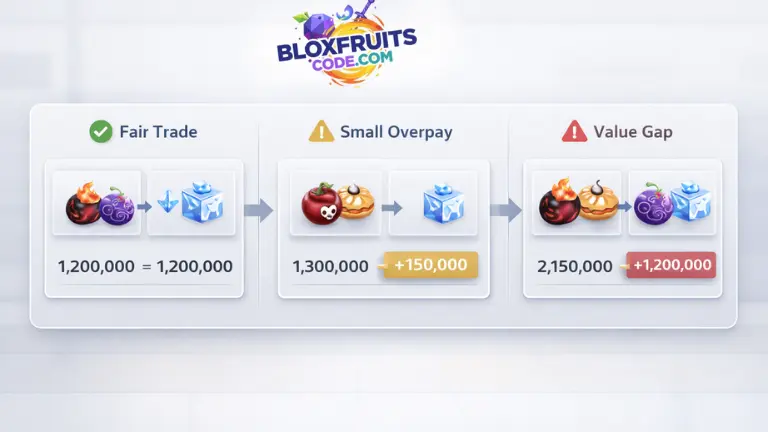
| Result situation | What it usually means |
|---|---|
| Values are close | The trade is near a fair range |
| One side is slightly higher | One side may be doing a small overpay |
| One side is much higher | The value gap is too wide |
| Values are close, but demand is uneven | The trade can still behave differently in live offers |
What does this calculator check?
This calculator checks the trade value comparison between the fruits on both sides of the offer. It is built to compare the total value you are giving against the total value you are receiving, so you can read the offer as a full trade and not only as separate fruit names listed in chat.
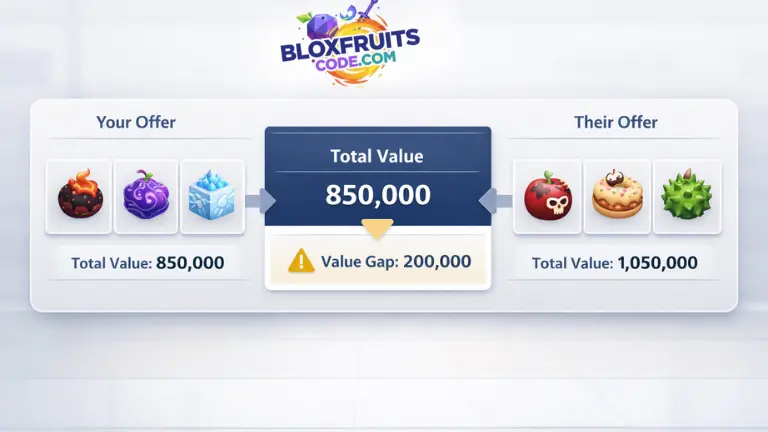
The calculator is also useful for multi fruit trades because one side of a deal is not always one fruit against one fruit. A user may add more than one fruit to balance an offer, and that is where a calculator becomes more useful than a rough mental estimate.
The page is strongest when it is used together with the Blox fruits values calculator, because the calculator shows the comparison, while the values page helps you understand the demand and trade weight behind the fruits being compared.
Practical trade steps
- Add the fruits you are giving
- Add the fruits you are receiving
- Compare the total value gap
- Check demand on the values page before accepting
What this calculator does not check
This calculator does not guarantee that another player will accept the trade. This calculator does not read your inventory. This calculator does not connect to Roblox accounts or game servers. This calculator does not predict future value changes after trade demand shifts.
A user should treat this page as a trade comparison reference page, not as an official trade approval system. The result helps you compare the current offer, but the final reaction still depends on the other player and the current demand for the fruits involved.
How this page is reviewed
This page is reviewed as an independent fan trade calculator reference page, and the comparison logic used here is tied to current trade value checks and active trade reference data, so the calculator can show a clearer gap between the value on your side and the value on the other side.
The result on this page should be treated as a trade comparison estimate, not as an official fixed answer from the game. A trade that looks fair on the calculator can still be rejected in live trading if the other player values demand differently or wants a stronger fruit mix on their side.
This page is not an official Blox Fruits page. This page is an independent fan reference page built for trade comparison.
FAQs
Is the calculator exact?
The calculator is not an exact fixed trade answer. The calculator is a trade comparison tool built around current value reference data, and live trades can still shift because the other player may rate demand, movement speed, or fruit preference differently from the raw number comparison.
Does the calculator use demand?
The calculator is strongest for value comparison first. A user should still check the values page for demand context because two offers can sit close in value while one side still carries a stronger trade pull in active trade rooms.
Does the calculator read my inventory?
The calculator does not read your inventory, connect to your Roblox account, or pull data from your personal items. A user has to enter the fruits manually on both sides of the calculator.
Can it compare more than one fruit on each side?
The calculator can be used for multi fruit trades because a real Blox Fruits trade is not always one fruit against one fruit. A user can compare a grouped offer on one side against a grouped offer on the other side to see the overall trade gap more clearly.
Related pages
If you want to check the demand and trade weight behind the fruits you are comparing here, continue to Blox Fruits Values because the values page gives the context that explains why two close offers can still behave differently.
If you want to see whether a fruit is currently available before buying it instead of trading for it, go to Blox Fruits Stock Right Now because stock availability and trade comparison naturally connect when a user is deciding whether to buy, wait, or trade.
You can also continue into broader fruit guides, such as Best Fruits for Grinding in Blox Fruits and Complete PvP Fruit Guide for Blox Fruits if you want more context around whether a fruit is worth chasing at all.
Reference note
This page is an independent Blox Fruits trade calculator reference page. The result shown here is based on trade value comparison and is used as a trade estimate before accepting or changing an offer.
